Color Tunnel puts you inside a first-person 3D cylindrical tube where you steer around solid geometric barriers at escalating speeds. Rather than controlling a rolling ball from behind, you rotate laterally across the 360-degree inner wall using just two directional inputs. One graze against a red or solid obstacle ends the run immediately, resetting your distance counter back to zero.
Each session starts at a manageable pace inside a brightly patterned corridor, giving you time to line up your angle before static blocks and rotating beams appear. Pressing the Left or Right Arrow keys - or A and D - shifts your perspective smoothly around the perimeter of the tube. Every few hundred meters, forward velocity steps up and the tunnel shifts to a contrasting color scheme.
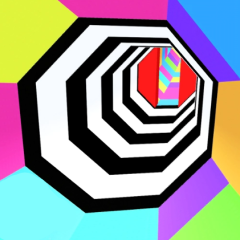
Because forward motion is automatic, survival depends entirely on reading the gap angle ahead rather than managing acceleration. Players who enjoy this pure two-button lane shifting will recognize the exact spatial layout in Tunnel Rush, one of the fastest-paced entries among our hot browser games.
Color Tunnel stands out for its zero-latency restarts and responsive two-key handling, making short practice sessions easy to repeat without menu delays. On the downside, rapid neon palette swaps can cause visual strain during longer runs, and the game offers no shields, checkpoints, or slow-motion pickups to forgive a late reaction. If you want a similar 3D runner that adds vertical jumping across open floor gaps, try Electron Dash, or test tighter corridor reflexes in Death Run 3D.
No. The browser version focuses strictly on survival distance without upgrade shops, shields, or unlockable skins. Every run starts on equal footing, relying purely on steering accuracy rather than collected items.
Yes. Desktop players can steer smoothly with either the A and D keys or the Left and Right Arrow keys, while mobile browser users drag left or right directly across the screen.
Palette transitions signal a higher speed bracket and shift background contrast against incoming blocks. Keep your eyes fixed on the center vanishing point during these flashes so sudden hue changes do not mask rotating barriers.